Login (
Forgotten?
)
Username:
Password:
Register (Join Us!!)
Username:
EMail:
Home
Forum
Showcases
Articles + Tutorials
Code Snippets
Link Archive
FAQs
About Socoder
Search
Latest Uploads
Extraterre ... .0.1 (zip)
dantheman363
Monty Teas ... Screenie 1
steve_ancell
Santa Clau ... ed his bag
waroffice
manic_platdude.png
spinal
Tetris Clone
steve_ancell
Super blues bros.
spinal
Square Surprise
JL235
for
Workshop #141
| No Votes
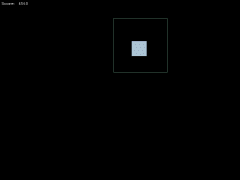
Keep within the rectangle.
Mouse
Show Sourcecode for this entry
Hide Sourcecode
; Square Surprise v.1 ; by Joseph Lenton - JL235@Kent.ac.uk ; 9th March 2008, 2:20am ; if used or distributed without credit being given then I'll come and break your legs ; ; Built for Wednesday Workshop 141 - The Rectangle Challenge ; at SoCoder.net ; notes: ; - the players x, y position is presumed to be equal to the mouse position ; ### Constants ### ; the starting width and height of the computer box Const SQUARE_WIDTH = 50 Const SQUARE_HEIGHT = 50 Const SQUARE_SPEED# = 2 ; the starting player width and height Const PLAYER_WIDTH = 180 Const PLAYER_HEIGHT = 180 Const SCORE_INCREMENT# = 5.0 Const SCORE_INCREMENT_INCREMENT# = 0.03 Const DEAD_TEXT$ = "You Died!" Const RESET_TEXT$ = "press any key to restart" Const COLOR_OFFSET = 50 ; ### Types ### ; Color ; represents a color which glows and changes ; (probably should have been called GlowColor like the version I wrote in Java) Type Color Field r.ColorComponent Field g.ColorComponent Field b.ColorComponent End Type ; Color Component ; the indevidual glowing component of a color Type ColorComponent Field col# Field max Field min Field inc# End Type ; Square ; all the data about a square, Type Square ; the centre (NOT top-left) of the square on screen Field x#, y# Field destX, destY Field deltaX#, deltaY# ; the width and height of the square Field w, h Field col.Color End Type ; Player ; all the data about the player Type Player ; the centre (NOT top-left) of the square on screen Field x, y ; CURRENT width, height of player Field w, h Field col.Color End Type ; Score ; represents the score data in the world, Type Score ; the current score Field score# ; how much the score will be incremented by Field increment# ; how much the score increment will be incremented by Field increment_increment# End Type ; ### Initialize! ### Graphics 800, 600, 0, 2 SetBuffer BackBuffer() SeedRnd MilliSecs() AppTitle "Square Surprise!" Local square.Square = Null Local player.Player = Null Local score.Score = Null ; when this is true the player is playing the game and the world will be updated Local alive = False ; when this is true the world will be updated Local reset = True ; ### Main Loop! ### ; (it's been too long since I've written that) While Not KeyDown(1) ; reset If Not alive If reset player = initializePlayer(player, GraphicsWidth()/2, GraphicsHeight()/2) square = initializeSquare(square, GraphicsWidth()/2, GraphicsHeight()/2) score = initializeScore(score) alive = True reset = False Else ; check for a keypress reset = GetKey() <> 0 EndIf ; update Else updateSquare(square) updatePlayer(player) alive = isSquareInsidePlayer(player, square) incrementScore(score) EndIf ; draw Cls drawSquare(square) drawPlayer(player) drawScore(score) If Not alive drawResetText() EndIf Flip Wend End ; end of program, here on are: ; ### Function Declarations ### ; ## Initialize Functions ### ; these functions either reset the given type to it's initial state ; and return it, or create a new one and set it to it's initial state. ; Initialize Score Function initializeScore.Score(s.Score) If s = Null Then s = New Score s\score# = 0.0 s\increment# = SCORE_INCREMENT# s\increment_increment# = SCORE_INCREMENT_INCREMENT# Return s End Function ; Initialize Square Function initializeSquare.Square(s.Square, x, y) If s = Null Then s = New Square s\x = x s\y = y s\destX = s\x s\destY = s\y s\deltaX = 0 s\deltaY = 0 s\w = SQUARE_WIDTH s\h = SQUARE_HEIGHT s\col = initializeColor(s\col) Return s End Function ; Initialize Player ; x, y - player start position ; creates and returns a new player type with the given location ; and also moves the mouse to the given location Function initializePlayer.Player(p.Player, x, y) If p = Null Then p = New Player MoveMouse(x, y) ; position p\x = x p\y = y ; size p\w = PLAYER_WIDTH p\h = PLAYER_HEIGHT ; color p\col = initializeColor(p\col) Return p End Function ; Initialize Color Function initializeColor.Color(col.Color) If col = Null Then col = New Color col\r = initializeColorComponent(col\r) col\g = initializeColorComponent(col\g) col\b = initializeColorComponent(col\b) Return col End Function ; Initialize Color Component Function initializeColorComponent.ColorComponent(col.ColorComponent) If col = Null Then col = New ColorComponent col\col# = Rand(100, 255) col\max = isValidColorComponent(col\col + COLOR_OFFSET) col\min = isValidColorComponent(col\col - COLOR_OFFSET) col\inc# = Rnd(-3.0, 3.0) Return col End Function ; Is Valid Color Component ; a color component is valid if it is greater or equal to 0 ; and less or equal to 255. ; If the given colour is valid then it will be returnd. ; If it is not then the closest valid value (0 or 255) ; will be returned instead Function isValidColorComponent(col) If col < 0 Return 0 Else If col > 255 Return 255 Else Return col EndIf End Function ; ## Update Functions ## ; Update Square Function updateSquare(s.Square) s\x# = s\x# + s\deltaX# s\y# = s\y# + s\deltaY# ; if we are moving away from the destination If isSquareMovingAwayFromDestination(s) setRandomDestination(s) EndIf updateColor(s\col) End Function ; Is Square Moving Away From Destination ; well, is it? Function isSquareMovingAwayFromDestination(s.Square) Return (s\destX# - s\x#) * s\deltaX# <= 0 Or (s\destY# - s\y#) * s\deltaY# <= 0 End Function ; Set Random Destination Function setRandomDestination(s.Square) ; set a new one s\destX = Rand(0, GraphicsWidth()) s\destY = Rand(0, GraphicsHeight()) Local angle# = ATan2(s\destY-s\y#, s\destX-s\x#) s\deltaX# = SQUARE_SPEED*Cos(angle#) s\deltaY# = SQUARE_SPEED*Sin(angle#) End Function ; Update Player ; p - the player to update ; moves the given player to the current mouse co-ordinates on the screen Function updatePlayer(p.Player) p\x = MouseX() p\y = MouseY() updateColor(p\col) End Function ; Update Color Function updateColor(c.Color) updateColorComponent(c\r) updateColorComponent(c\g) updateColorComponent(c\b) End Function ; Update Color Component Function updateColorComponent(c.ColorComponent) c\col# = c\col# + c\inc# If c\col# > c\max c\col = c\max c\inc = -c\inc Else If c\col# < c\min c\col# = c\min c\inc = -c\inc EndIf End Function ; Is Square Inside Player ; p - the player to compare with ; s - the square to compare against ; returns true if the square is completely within the player, false if not. Function isSquareInsidePlayer(p.Player, s.Square) Local w = (p\w-s\w)/2 Local h = (p\h-s\h)/2 Return ((s\x-w < p\x) And (s\x+w > p\x) And (s\y-h < p\y) And (s\y+h > p\y)) End Function ; Increment Score ; increments the score and the amount of which it is incremented by Function incrementScore(score.Score) score\increment# = score\increment# + score\increment_increment# score\score = score\score + score\increment# End Function ; ## Drawing Functions ## ; Set Color Function setColor(col.Color) Color col\r\col, col\g\col, col\b\col End Function ; Draw Square Function drawSquare(s.Square) setColor(s\col) Rect s\x-s\w/2, s\y-s\h/2, s\w, s\h, True End Function ; Draw Player Function drawPlayer(p.Player) setColor(p\col) Rect p\x-p\w/2, p\y-p\h/2, p\w, p\h, False End Function ; Draw Score Function drawScore(score.Score) Color 255, 255, 255 Text 5, 5, "Score: " + Int(score\score#) End Function ; Draw Reset Text Function drawResetText() Local strHeight = (StringHeight(DEAD_TEXT$) + StringHeight(RESET_TEXT$)) Color 255, 255, 255 Text (GraphicsWidth()-StringWidth(DEAD_TEXT$))/2, (GraphicsHeight()-strHeight)/2, DEAD_TEXT$ Text (GraphicsWidth()-StringWidth(RESET_TEXT$))/2, GraphicsHeight()/2, RESET_TEXT$ End Function ; ## stuff missing from standard command library ## ; Max ; returns the larger of the two values Function max(a, b) If (a > b) Return a EndIf Return b End Function ; Min ; returns the smaller of the two values Function min(a, b) If (a < b) Return a EndIf Return b End Function
There are no comments for this entry.
Latest Posts
Fucking Pound Sign Unicode Bullshit Bollocks
rockford
Tue 03:54
Screen Burn of the Mind
rockford
Tue 02:13
RoadRash!
Mog
Mon 10:56
Progress / Location Bars
Afr0
Mon 10:28
Noel's Graduation
rockford
Mon 07:37
Development via GUI
waroffice
Mon 02:48
Audio Rant
steve_ancell
Sat 19:16
Wrong Partition!!!!?
spinal
Sat 11:24
eBay Lies
spinal
Fri 23:44
Shoutbox Topic - 968
dna
Fri 19:42
More
Latest Items
News : Newsletter #176
Jayenkai
Sat 04:49
News : Newsletter #175
Dabz
Tue 09:38
Blog : Snow: More Material Junk
Cower
Sat 23:17
Dev-Diary : Mutant Monty: Amstrad CPC to Windows conversion
rockford
Fri 13:14
Techy : AppleTV
Jayenkai
Thu 09:40
Blog : Graphviz
steve_ancell
Sat 14:17
Pets : Top-Down Shadow Hack
Jayenkai
Tue 05:52
Snippet : JNKrunch v1.0
Jayenkai
Sat 07:20
News : Newsletter #173
waroffice
Fri 04:47
Blog : Material Loading
Cower
Fri 02:08
Pets : I Done Won A Thing
shroom_monk
Sun 11:31
Pets : Repurposing A Lexer
Cower
Mon 22:06
Bah : Feeling a Little Angry
spinal
Mon 11:26
News : Newsletter #170
Dabz
Sat 00:34
Showcase : sbfgen
Cower
Sat 16:57
More
Who's Online
Jayenkai
Tue, at 04:15
steve_ancell
Tue, at 04:04
rockford
Tue, at 03:54
CodersRule
Tue, at 03:25
Afr0
Tue, at 03:11
shroom_monk
Tue, at 01:18
spinal
Mon, at 23:28
Dabz
Mon, at 23:18
therevillsgames
Mon, at 22:14
Evil Roy Ferguson
Mon, at 20:54
Link to this page
Site :
Jayenkai
2006-Infinity |
MudChat
's origins,
BBCode
's former life,
Image Scaler
.