
|
SoCoder -> Showcase Home -> Platformer |
|
|
|
|
Jayenkai
|
Hero (Greenie - v0.9)Remake of the Activision classicHero v0.9 |
Screenshots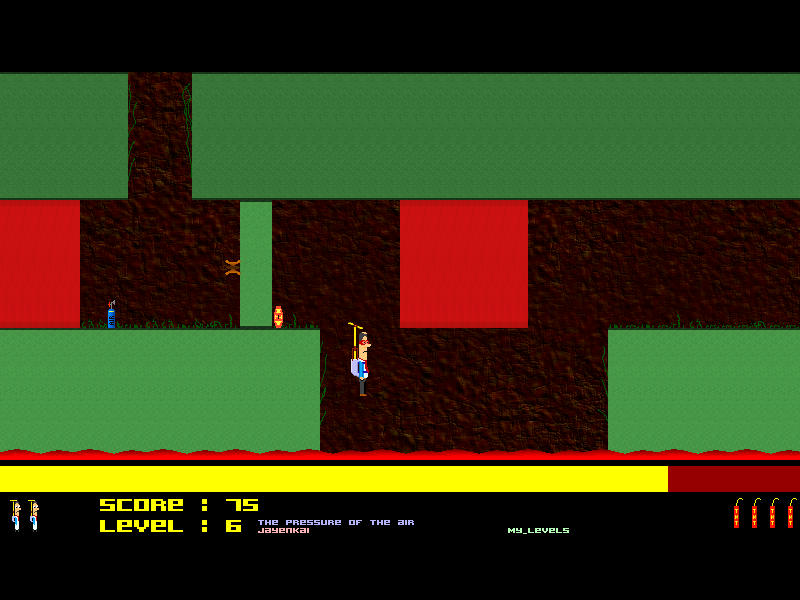
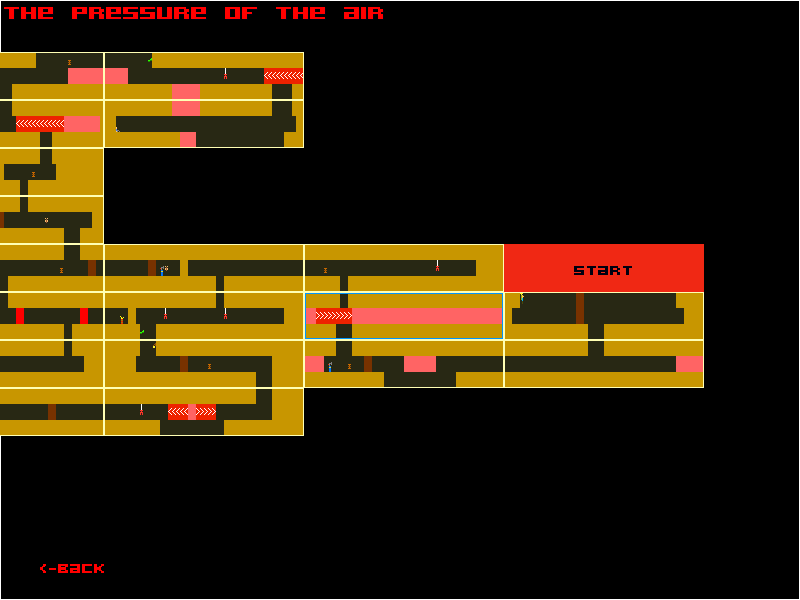
|
|
|
Greenie : The Helecopter Hero My Hero remake. A game I started, but forgot to finish! I started this in June 2006 for the Retro Remake 2006 compo, but forgot all about it, and never ended up entering it. Typical! Comments and Suggestions are welcome. |
|
Latest UpdateRelease version 0.9 A few more tiles added to the game. Should make for a more interesting selection of levels. Additional tile/object suggestions are appreciated. Mouse and Better Joypad control added to the main menu. A few Command Line settings added. (See readme.txt) Quite a few bug fixes. Ability to hit walls on the next screen, along with a switch on the editor to disable wall cloning. HeroLevelFormatv0.4 levels can be posted directly to the forum. Also includes Random Generator v2 with a more logical random level outcome. 20 Original levels, 15 by Jayenkai, 15 by B3DMan and also Headache by B3DMan! Release version 0.8 Proper Release #1 Complete with all 20 original Atari 2600 levels, and 7 of my own. Make your own levels with the Built in Editor. Build some random levels. and so much more! (Well, not that much more!) Not much added, really, in this release. But the main menu's now working properly, and even allows you to select different level packs! The "Start Anywhere" option should pick a random pack, and start you off on a random level (once that level has been opened, of course!) Everything else should be about the same as it was, give or take a few tweaks here and there. |
|
|
|
|
Comments |
|
| Sunday, 15 April 2007, 10:44 | |
magicman
|
very nice. keep it up. how many levels will it have when its finished?

|
| Sunday, 15 April 2007, 14:55 | |
Jayenkai
|
The original Atari 2600 game had 20 levels. I'll be putting them in first. (Although, they're not exact, I'm doing it by hand, so it's a little off here and there!) I'm also halfway through making a Level Editor, so there should be plenty of levels coming out of that. If you try out the game I made for WW 19, you'll find a nice simple version of Hero in there. That version actually works by generating random levels. I'll be nicking that Level Generation method, and buiding it up a little, to make some pretty decent levels. (Both for playing, and for "Ready Made for Editing" types of levels.) All in all, there should be a fairly large number of levels ready for playing. But first I have to finish off hand-crafting the other 10 of the original levels, and they're getting more and more complex with each level! For anyone interested, I'm using this site's list of level maps.
|
| Sunday, 15 April 2007, 17:26 | |
|
caffeinekid |
Cool Beans, Jay. Good to know this is getting worked on again and not one of the many many MANY games that were promised for the competition, never to be heard of again.  Keep us updated.
|
| Sunday, 15 April 2007, 17:32 | |
Blitz3Dman
|
I'd be happy to help make the extra levels if I can; I love making levels for games especially when I get to play them afterwards
|
| Monday, 16 April 2007, 07:29 | |
|
Jayenkai
|
Updated to version 2. If all goes well, the level editor should be available in the next release. (Maybe tommorrow?)
|
| Tuesday, 17 April 2007, 06:34 | |
|
Blitz3Dman
|
Hm... hows it coming, Jay? we haven't got much news the last couple days.
|
| Tuesday, 17 April 2007, 07:17 | |
|
Jayenkai
|
Did you read the comment directly above the comment you just made? I released version 2! Today I'm playing with Forum icons, so I'll get back to Hero shortly.
|
| Tuesday, 17 April 2007, 07:51 | |
|
Paul |
I'm sorry nut I'm just flying straight up to the roof getting stuck??? Am i the only one with this problem?? |
| Tuesday, 17 April 2007, 07:53 | |
|
Jayenkai
|
Walk to the pillar on the right, Push down to drop some TNT, then leg it out of the way.
|
| Wednesday, 18 April 2007, 16:22 | |
|
Blitz3Dman
|
Is the level editor included with the download yet?
|
| Wednesday, 18 April 2007, 16:40 | |
|
Jayenkai
|
Not just yet. I'm currently working out a small issue with the "Crushing Blocks", which aren't currently as tweakable as I'd like them to be. They do fine in the original levels, but they're rubbish if you want bigger gaps/crushes. What I'm trying to do is to get the editor as simplistic as possible, so you plonk the things down, and it just figures out what you'd want. But I need a bit more control, so. it might end up a little more complex than that.
|
| Friday, 20 April 2007, 07:58 | |
|
Jayenkai
|
Crushing blocks are doing what they should. I finally figured out the easiest way to do it. Plop down bricks with arrows on them, then let the game figure out their timings and stuff. Sorted! Demo release #3, including Levels 1->15 and the level editor is now available via the download. Get building levels to get them into the next release.
|
| Sunday, 22 April 2007, 07:37 | |
|
Blitz3Dman
|
I downloaded it but using the level editor I got frequent MAVs. One of the things that seemed to cause it (seemed, it didn't always happen with this) was when I tried to write a level with 20 or more rooms.
|
| Sunday, 22 April 2007, 07:56 | |
|
Jayenkai
|
*bangs head on desk* Fixed and Uploaded. Demo 4 released a little early! (Now all 20 levels are in there!) Sorry, I got all confused with one of my arrays, so it was actually giving you 1000 levels with 20 rooms, not the other way round. I hadn't noticed yet, since the classic game had only 16 rooms in it's biggest level. Thanks for pointing that out B3DMan. Um, the random button doesn't do anything yet!
|
| Sunday, 22 April 2007, 08:03 | |
|
Blitz3Dman
|
Glad to help  I'll try and make some nice levels for you. I tried to make a level that might remind you of Metroid (aimlessly wondering around a giant mazelike level praying you stumble upon the exit) but I tried to write it and lost it. Oh well I'll get to work on a new one sometime later. |
| Sunday, 22 April 2007, 11:51 | |
|
Blitz3Dman
|
Please do not change the destructable blocks, I'm begging you!! The difference is that there's no grass. This way, you can put them someplace unobvious, and the player must pay close attention to see it. Also, this is a remake, so you should add a few features. A suggestion is that you make it so there are variable time limits for levels, so if you want to make a humungous level you can give the player more time, or if you have one that is limited to only a few rooms you can rush the player One other thing to do is when you save a miner, tell the game to only have the player win if it's the last. If not, give the player 10% more time and some points. That way you can make multiple miners for another reason to explore everywhere.Also, you can make a coin system or punch card system where every 10 or so collected you gain another life. Yet another: TNT pickups. This way if you run out it's no problem getting more. At least if you know where to find it Some enemies of your own creation would be good also. One that you definately want to consider adding is a worm facing the other way. Don't think I'm trying to criticize your game; it's great. But these are just some suggestions for you to make it even better
|
| Sunday, 22 April 2007, 12:24 | |
|
Blitz3Dman
|
Erm, why did my level screw up when I reloaded it in the editor? |edit| Apparently you may not be resetting all the arrays integers and things when you start the level editor. I ended up with some 'invisible ground' at the bottom of one of my screens that used to be there in my last level.(there was grass at the very bottom and it was ground.) |edit| Erm, a jump to level option for test would be appreciated... |
| Sunday, 22 April 2007, 13:19 | |
|
Blitz3Dman
|
 |moan| Found another bug |moan| |moan| Found another bug |moan|When looking at the overview of the map, the moving magma walls don't show up as anything. 
|
| Sunday, 22 April 2007, 15:00 | |
|
Jayenkai
|
Remake = New features = Obviously planned, but first I wanted to ensure it could 100% play the original levels. Now that I know it can, I'll start adding extras. The Lanterns on Right, and Snakes on Left things are part of the original, I'll probably redo those so that if you put a snake next to a wall, it faces the opposite direction automatically (same with lanterns) TNT additions will be added, of course. The "Extra Time" was planned to be additional air tanks picked up along the way. (Although, he's not noticeably breathing air.. That's just a nit-pick )But the idea of shortening the allowed time. I didn't consider that. So perhaps a tweakable time limit will be better. Multiple Miners. (Kiddies!) I guess.. but I was actually planning on just having the one Kid per level, and having other items be a reason to go in other directions. I'd rather have it that way, than have Greenie somehow miraculously pick up a dozen kids in his pockets, or something! Every X collected = Extra life. It's supposed to be Every 20,000 points = Extra life (or something. I actually forgot to add that!!) Jump to Level will be included in the next release. It's something I've been trying to decide upon, but I think I'll make it a selection of Levels 1,5,9,13 and 17, like in the original. (But, of course only allowing you to choose 5 if you've managed to get up to 5!) But also allow the My_Levels.pak file to be selectable at any level. I dunno. I'll see which idea works best. The Level/Floor/Grass Bug. Is that to do with a 4-height level? I haven't fully tested those, to be honest. I just shoved them in when I realised they'd fit! Are they working ok, otherwise? And last.. No, the overview map doesn't have magma, does it! Silly me!
|
| Sunday, 22 April 2007, 15:18 | |
|
Blitz3Dman
|
Hoo... went and played HERO to find all the bugs and have some fun in the meantime (: went to church began coding my WW entry TANKTICS and it's about 75% complete now not counting making loads of levels. |
| Monday, 23 April 2007, 15:26 | |
|
Blitz3Dman
|
Hmm... one more thing that I noticed. You seem to be using the ImagesCollide or ImagesOverlap as opposed to RectsOverlap or ImageRectsOverlap (could be wrong but the bug's still there) because when laser vision-ing a wall, somethimes when the hole is made just right, the wall cannot be lasered any more unless you jump to a higher er, height and laser vision it because the collision will not work.
|
| Monday, 23 April 2007, 16:50 | |
|
Jayenkai
|
Yeah, I noticed that today. I think it's actually due to my quick+easy "Pixel Height of Lazer / 128" way of figuring out which brick its hitting. I need to play about with the maths a bit to get it to work right. Release was planned for today, but I'm going to leave it behind till tomorrow (OMG! Missed Deadline!) so that I can get the Level Pack Selection menu working. If you've any levels, now's the time to send a few over. Send a Level name (and a name you'd like to be set as your Author name) with each level, so I can add them into the engine. (If you can't think of any level names, I'll get the random level name generator to pick them for you )
|
| Monday, 23 April 2007, 16:53 | |
|
Blitz3Dman
|
Actually, I was going to wait till thiscoming release so I can see moving magma walls and use pickups and such in the levels.
|
| Monday, 23 April 2007, 17:04 | |
|
Jayenkai
|
Oh, ok.. I'll build a few levels of my own for the first proper release, then. Level Making Progress is significantly sped up with the Random Level Generator, but I keep spending time tweaking the generator, as opposed to building levels
|
| Monday, 23 April 2007, 17:19 | |
|
Blitz3Dman
|
Um, how do you make lava in it? (I never got far enough in the classic levels to see it >.<)
|
| Tuesday, 24 April 2007, 00:45 | |
|
Jayenkai
|
Oh, yeah, I forgot to mention that. Any room which doesn't have another room below it will automatically be given a running lava flow along the bottom. Just make sure there's a gap at the bottom to reach the lava.
|
| Tuesday, 24 April 2007, 05:27 | |
|
Blitz3Dman
|
oh,ok.
|
| Tuesday, 24 April 2007, 08:21 | |
|
Jayenkai
|
First proper non-demo release. (You can tell, 'cos now it's called "Greenie : The Helecopter Hero" on the titlescreen!) Random Level button works in the editor, and.. other bits and pieces. |edit| Just did a really tiny update, nothing to worry about, just the save file corrupts fit if you delete a .pak file! Redownload if you're planning on deleting .pak's! |edit|
|
| Wednesday, 25 April 2007, 09:58 | |
shroom_monk
|
I think my computer is slow... I spent 2 minutes waiting for the menu to drop down, then I couldn't select anything from it!!!  Nice music, though. Nice music, though.
|
| Wednesday, 25 April 2007, 15:23 | |
|
Blitz3Dman
|
Something that got annoying is how the floor of one room is always the ceiling of the one below it and vice versa, and the one tile of wall at each end is always the same, and yet the enimies are not. It often gets irritating when I want to place a breakable wall on the ground because it is on the ceiling of the room it leads to, unbroken. Also, if I would like a magma wall ceiling but not a lava wall floor in the room above it, it's tough beans. I don't know if this can easily be changed, if you don't want to change it, or what, but it's just a suggestion.
|
| Wednesday, 25 April 2007, 15:40 | |
|
Jayenkai
|
I've come to that same conclusion myself. I'll probably add a "I can manage this!" tickbox on the editor, or something, to remove that requirement. But if you have a block at, say, 12 across at the top line, and not one on the room above it, then flying down will cause you to appear mid-block.. So it was initially done for a good reason. Meh.. I'll tweak. Shroom_Monk, check out the Speed Test topic that I'm posting shortly.
|
| Wednesday, 25 April 2007, 16:22 | |
|
Blitz3Dman
|
Maybe have it so new room=room above its floor as ceiling, left room wall is left wall right room wall is right wall and floor is the room to the bottom's ceiling, but changing it won't alter the other rooms. |edit| for fixing stuck in blocks, you can check the adjacent rooms. Example case: if the room above has a floor where you're trying to go up, you'll be stopped. |edit| |
| Wednesday, 25 April 2007, 16:37 | |
|
Blitz3Dman
|
Ah, thank you for keeping scrolling the level in big mode from making a new room. just downloaded new version.
|
| Wednesday, 25 April 2007, 17:03 | |
|
Blitz3Dman
|
Erm, why did I keep gaining lifes sometimes instead of losing them? is this a bug or am I missing something?
|
| Wednesday, 25 April 2007, 17:27 | |
|
Jayenkai
|
If I do what you're suggesting, then how exactly would the player know what is an open passage, and what is closed? I dunno.. I'll see what I can come up with, anyway. Yes, I removed "New Room" from Map mode, it was getting annoying. I dunno if it's in that version, but I've recently added "Right click = Scroll to room" in the map, too. And.. Not really sure what's up with the lives. Every 20,000 points, you get a new life. It might be buggy, though. Let me know if you spot anything freaky happening with it.
|
| Wednesday, 25 April 2007, 18:05 | |
|
Blitz3Dman
|
 If I do what you're suggesting, then how exactly would the player know what is an open passage, and what is closed? If I do what you're suggesting, then how exactly would the player know what is an open passage, and what is closed? ahh, but that's the thing! they don't. It might be buggy, though. Let me know if you spot anything freaky happening with it.yea, I died so I was down to one life and died again and had 2 lives then died and had one life and it happened again then instead of the bug I got game over. when laser vision-ing a wall, somethimes when the hole is made just right, the wall cannot be lasered any more unless you jump to a higher er, height and laser vision it because the collision will not work |edit| unless you go to a different height. |edit|I'm not sure if the bug should be fixed already or not, but I'm still getting it. |
| Wednesday, 25 April 2007, 18:09 | |
|
Blitz3Dman
|
erm, may we see a pause button? Hmm, Idea: one way walls |
| Wednesday, 25 April 2007, 18:21 | |
|
Blitz3Dman
|
|moan| the test your levels button doesn't seem to work |moan| |edit| nevermind, I just discovered mouseclicking doesn't work. it'd be nice if it did |edit| |
| Wednesday, 25 April 2007, 18:39 | |
|
Blitz3Dman
|
When you pick up TNT it disappears, but air things stay. Is this done on purpose, because it seems kind of unusual.
|
| Wednesday, 25 April 2007, 20:46 | |
|
Jayenkai
|
Geeze, you don't half moan! I'm gonna have to add pages to comments, now! I don't know what's going on with the lives thing.. I've not had it happen, but if it does I'll take a look at why. The Lazer/Height thing might be a graphical issue caused by color-likeness. I'll make the backgrounds a little darker. Pause button. Is it needed that badly? Meh, it's not hard, I'll shove one in. The main menu isn't mouse enabled, because you don't use the mouse in the game. Seemed logical to me! But I'll shove the mouse back in, because it looks like that baffled Shroomy, too. One way walls? That could mean many different things. All of which could work well, so I'll probably add all of them. And, last but not least.. You collect TNT. Because you carry TNT. He has 6 sticks of TNT, 3 in each of his pockets.. Note that his hands are in his pockets.. You do not pick up Air. You turn it on, and it resupplies the mineshaft. Where would he carry a gigantic tank of air? The idea that he'd go around picking up all those tanks of air is as silly as the collecting kids idea!
|
| Thursday, 26 April 2007, 05:41 | |
|
Blitz3Dman
|
Ok, and the mouse thing was fine but the fact that the level editor worked as a button but nothing else made things confusing. There went the site again! |
| Thursday, 26 April 2007, 05:50 | |
|
Blitz3Dman
|
Sorry, Jayenkai, I should be ashamed. Play my level and get an even bigger headache! yeay! |edit| You can't post levels into the forum like that.. You'll have to zip+email it. |edit| |
| Thursday, 26 April 2007, 05:57 | |
|
Blitz3Dman
|
Hm... just spotted a bug with the randomizer. I blobked off the kiddie completely with a magma wall because it likes to put the at the sde of rooms. |edit| ok, sorry |edit| |
| Thursday, 26 April 2007, 05:59 | |
|
Jayenkai
|
Yes, it still does that, occasionally, with the New+Improved randomizer. But then, that's why it's in the Editor, and not on the main menu! If it were perfect, you could just select "Random Level" in the main menu, and start playing!
|
| Thursday, 26 April 2007, 06:01 | |
|
Blitz3Dman
|
Aha! Idea! Perfect it and add an option play random level on the title screen! Eh? |
| Thursday, 26 April 2007, 06:07 | |
|
Jayenkai
|
<sarcasm>Oh, wow. What a great idea.</sarcasm> That was pretty much the plan throughout!
|
| Thursday, 26 April 2007, 06:31 | |
|
Blitz3Dman
|
Another bug spotted. Although you have the lamps and snakes switch direction when you place them, they only face one direction when uing the big view. |
| Thursday, 26 April 2007, 06:45 | |
|
Jayenkai
|
It's a Tiny view! Stop calling it a Big view! That's not so much a bug, as it is a "It'll do, it's really tiny anyway!" 'Feature'! .. In the next release.. I went for the "If there's a solid object in the next room, you can't get through" technique. And added in a "Wall Checks/No Wall Checks" switch for drawing.
|
| Thursday, 26 April 2007, 14:00 | |
|
Blitz3Dman
|
cool. ok. don't take my comments as criticism; take them as worse! no, not really, I'm just helping
|
| Thursday, 26 April 2007, 17:41 | |
|
Blitz3Dman
|
|moan| the player moves too fast for precision movements... can we see a slower movement speed, please? |moan|
|
| Thursday, 26 April 2007, 18:23 | |
|
Jayenkai
|
No. The player moves at about the right speed, set in the classic game. .. Actually, the original plays a teensy bit quicker. BUT.. If you want analogue control, shove in a joypad/stick and play with that.
|
| Thursday, 26 April 2007, 19:00 | |
|
Blitz3Dman
|
oh, ok, didn't know that.
|
| Friday, 27 April 2007, 00:06 | |
|
shroom_monk
|
So... will there be a way of doing less processing so it runs faster on my slow computer, or is my computer just completely useles...?
|
| Friday, 27 April 2007, 02:39 | |
|
Jayenkai
|
The loading sequence is having a few nips and tucks, and the graphics are being compressed. Other than that, I'm not really sure what else can be done. Once the new version's up, I'll let you know.
|
| Friday, 27 April 2007, 05:45 | |
|
Blitz3Dman
|
Hm, Jaynkai, I just got a great idea that should both speed up your program's tile drawing routine and speed up your program in general. I am assuming that you are drawing each tile as an image, but what you should be able to do is check if there are tiles in a row and instead of doing something like this: You could try doing something like this: I probably left out a couple things seeing how I wrote this from memory but it should express the idea. I'm not sure it'll be faster, but it'll mean less images and an effecient drawing routine. |
| Friday, 27 April 2007, 06:22 | |
|
Jayenkai
|
Draw less images? When I last bothered to test it, (A LONG time ago!) I could get about 1000 images drawn in a frame, and still keep up a 60fps framerate. The map goes up to 50x4, which is 200 images.. Plus Player, plus a few object, plus the stuff at the bottom. At an insane max, the game's not drawing any more than 250 images, so I don't think the image drawing is a problem.
|
| Friday, 27 April 2007, 06:24 | |
|
Blitz3Dman
|
Oh, ok. Well if it gets to be you know this
|
| Friday, 27 April 2007, 07:58 | |
power mousey
|
hey Jay, why don't you hire the Blitz Man of 3d on as a full beta tester for you?? I'm sure you and him can work out a contract and financial arrangements. Seriously, I can see Blitz3dman going into development in a few years and perhaps also as a consultant for quality assurance/re-assurance. Just like Charley and others in Gamebox 1.0  Pretty awesome movie for its time of 2004. I like the different game areas of Crime Spree, Zombie Land, and Alien Planet. Those zombie ninjas freaked me out!! www.amazon.com/Game-Box-Widescreen-Nate-Richert/dp/B000MRNWJM |
| Friday, 27 April 2007, 11:45 | |
JL235
|
I don't find Hero slow at all. Very nice, very polished, but not my sort of game. |
| Friday, 27 April 2007, 13:55 | |
|
Blitz3Dman
|
Erm, quoting the most current readme,There are currently 15/20 of the original Atari levels Notice anything odd? No, not that I bothered to read the readme  that it still says 15/20 levels that it still says 15/20 levels@Power Mousey the only financial agreement would be that if he sells it for some reason I get a free copy
|
| Friday, 27 April 2007, 14:17 | |
|
Blitz3Dman
|
Why in the level editor for position in relation to the start does it read right now "ABOVE 0009 BELOW 0011" |
| Friday, 27 April 2007, 14:34 | |
|
Blitz3Dman
|
One more thing May we see the ability to delete an existing room? |
| Friday, 27 April 2007, 14:50 | |
|
Jayenkai
|
Highlight the word "Above" (or whichever room) then hit the delete key. (Doesn't give a warning, but I figured Delete Key was enough of a distance from other buttons that it wouldn't matter, and couldn't be accidentally tapped!) Dunno why there's a room above Start. There really shouldn't be! Maybe the random thing randomly plopped one there somehow. The new one won't! Oh, and I have updated the readme since I posted the last version, so no worries there
|
| Friday, 27 April 2007, 14:56 | |
|
Blitz3Dman
|
Er, I think I broke Hero... I saved a room with a little over 300 rooms and it instead saved the levels after it as this: a level with a freaky name that glitched when I played it (I got stuck in a room the had no room to the bottom, sides or top to go to in the middle of playing) when I played it, a level that I opened it and tried to have tiny(big!) view of it I got a MAV. A level that says it has 18 rooms but seems to have 0, and one with freakishly tall & wide rooms. |
| Friday, 27 April 2007, 15:11 | |
|
Jayenkai
|
Yes, I know.. I think I mentioned that in an earlier comment. It's writing the "Rooms this level has" number as a byte, so it can't go over 255.. (DUH!!!) New version fixes that. Apologies. Delete and rename one of your backups, and sorry for losing you 300 rooms worth of level!! (oopsy!)
|
| Friday, 27 April 2007, 15:20 | |
|
Blitz3Dman
|
(mumbles)
|
| Friday, 27 April 2007, 15:37 | |
|
JL235
|
Jayenkai (Doesn't give a warning, but I figured Delete Key was enough of a distance from other buttons that it wouldn't matter, and couldn't be accidentally tapped!)What if you own cats? Mine used to always walk and lie over my keyboard, but only if I was using it. You should seriously consider building in more protection against animal interfearance in Hero. |
| Friday, 27 April 2007, 15:39 | |
|
Jayenkai
|
Aaah, but your mouse pointer isn't likely to be over the word Above/Below/Left/Right at the same time, though! I considered cats.. I have one myself!
|
| Friday, 27 April 2007, 17:42 | |
|
Blitz3Dman
|
Wow, fortunately ( for you, ) .backup3 was able to save my 91 room game.
|
| Friday, 27 April 2007, 17:45 | |
|
mike_g |
Why should Jay care if your 91 room game got baked up or not 
|
| Friday, 27 April 2007, 17:54 | |
|
Jayenkai
|
'cos Jay wants a few levels for the next release
|
| Friday, 27 April 2007, 18:10 | |
|
power mousey
|
hahaa True. Blitz3dman, may I suggest you open your bedroom as a game consulting firm for full beta testing operations. Each bug confirmed is applied the appropriate fee. Additional fees for game bugs fixed. I'm joking. But you never know...thats why I'm also serious. You are attentive to details as well as to ideas and suggestions. Hey, why not?? cheers, power mousey |
| Friday, 27 April 2007, 18:38 | |
|
Blitz3Dman
|
lol, my bedroom  beta testing studio! beta testing studio!my bedroom ~ a dumpster! |
| Friday, 27 April 2007, 18:56 | |
|
power mousey
|
exactly!! True. thats usually how a developer firm office or cubicle is supposed to be. Well, the few that i have seen in real life and especially in computer or game movies. hmmmmmm...call your company The Dumpster Dive no, seriously.... |
| Sunday, 29 April 2007, 06:50 | |
|
Blitz3Dman
|
Oh, jay, a note about my levels: they are all beatable I either beat them myself or lost my last life on the next to last room but there were no doubts of it being possible to bass what was up ahead. The maps are fully bug tested and I think they should be 100% bug-free (aside from game bugs ).
|
| Sunday, 29 April 2007, 08:10 | |
|
power mousey
|
time to punch out.... collect and cash my pay check. Good job, Blitz3Dman. Like I said, you are attentive to details both in the big and the little things. Again, your choice, but with all that attention and focus.....a developer and QA man. I see this as a most likely and golden opportunity. True. Serious, and cheers power mousey |
| Sunday, 29 April 2007, 10:56 | |
|
Blitz3Dman
|
Oh, Jay, on that pause menu, a restart level option would be very nice. Also, I'd like to see the ability to save as something other than My_Levels. To make your stuff look more proffesional, you also ought to add an extension to your level files like .lvl .map .hro or something like that. |
| Sunday, 29 April 2007, 14:55 | |
|
Jayenkai
|
.pak is a pack of levels..! Other than My_Levels is a thought, but then you'd have to also let the user Load their pack of levels, every time they enter the editor, too. If I keep it as My_Levels, then they save, build up, then rename and start again from scratch. I thought that was the easier way to do things? And I haven't added a pause menu, yet! (oopsy!) Thanks for reminding me!
|
| Monday, 30 April 2007, 08:57 | |
|
Jayenkai
|
OK, Last day of April = Version 0.9 I think this is probably going to be the last release. I mean, I tend to forget about my projects days later, so.. I don't know. I'd like to get working on something else for a while. If there are any major bugs/great suggestions, I'll get to work on them. Otherwise, enjoy the game, and get building those levels!
|
| Monday, 30 April 2007, 13:57 | |
|
Blitz3Dman
|
|moan| it seems you've forgotten the one-way walls, and I can't figure out what the things shown with white arrows in the editor are doing when you touch the flashing red circle |moan| |edit| ok, the one way walls are there, but what in the world are those flashing red things supposed to do??? And that wasn't necessarily what I meant by one way walls, I meant they allow you to go through one way but not the other. |edit| Although I really like the key and door thing. And whatever happened to coins..? |
| Monday, 30 April 2007, 14:34 | |
|
Blitz3Dman
|
|moan| one way walls only work if your walking on the ground |moan|
|
| Monday, 30 April 2007, 14:50 | |
|
Jayenkai
|
The "Trapdoor"-esque wall things only work if you walk on the little lumps on the floor. I thought they were noticable, but not TOO noticable, so they'd be a nice way to do it. I couldn't logically work out a way to allow them to exist in the world whereby the whole tile would be touchable.. The "Red flashing things"? Seriously? You couldn't work them out? They're mines! If you get close, it starts flashing, then it goes kabloowee. If you detonate something nearby, it's flash-time will be reduced. If you line up a load with about 3 tile-spaces between them, then set off the first, they'll all start a-popping. Gameplay wise, Try placing a standard 2-wide destructable wall, followed by a mine. Set off the tnt to destroy the wall, and by the time the player's ran back to the hole in the wall, the Mine's about ready to blow. Or give level 14 of my levels a go.
|
| Friday, 11 May 2007, 17:53 | |
|
Blitz3Dman
|
Ok, question: HOW THE HECK IS YOUR THING ABLE TO SAVE SO QUICKLY MY GAME WORLD SIZE IS DOWN TO 32 x 32 SCREENS BECAUSE IT'S SO SLOW AND IT STILL SAVES AND LOADS SLOW AS A TURTLE!! |edit| make that a DEAD TURTLE! |edit| |
| Friday, 11 May 2007, 18:17 | |
|
Jayenkai
|
Ok, here's how I do pretty much all my level format stuff. 1) First off, make you test level in a text file. Use notepad.. Test.lev 1's for floors, 2's for walls, 3's for ladders, that sort of thing. S=Start, X=Exit. You get the idea. Make sure it's readable in plain ascii. 2) Get the proggy to read it line by line, and convert it to a map array. 3) Once that's working, make a small proggy using the JNKrunch routine to take all lines of the ascii, add them together, and spit out a smaller single line of crunched data. Dump that single line into Test2.lev 4) Add JuNKrunch to the level Loader and make sure it gets back all the data and can read it all nice and quickly. Instead of Line by Line reading, you'll now need to read chr by chr from the uncrunched line of data, and move along the lines as each one fills up yourself. 5) Then make the editor, and make sure it saves out using JNKrunch. 6) And last of all pack a bunch of levels together into a single file. The most important thing I've started doing lately, which REALLY speeds things up, is completely getting rid of extraneous data. For example, in Hero walls are either 1,2,3,4,5 or 6. 1 is Normal, 2 is Destructable, 3 is Red, 4 is Red destructable, 5 and 6 are Moving walls (5 for right, 6 for left) When the loader reads it, it finds 5's and 6's that are next to each other, and works out how wide the moving should be.. It does it itself without extra info having to be saved to the data file. The play engine actually adds the plants by looking at where walls are. Again, this isn't added to the file. It's quicker without it. All baddies/Objects are also single ascii characters. B for bat, W for Winged moth, S for Snakes.. Snakes and Laterns get moved to the left or right by the Play Engine too. It's just a matter of keeping everything as simplistic as possible. Like.. For platforms you could have a row of 1's, and then have the loader add "edges" to the platforms itself.. If you need moving platforms and the like.. Well, you can say "here's a bunch of points, move between those" or even "start here, and bump between the two walls" Just remember to keep the file simple, and you can't really go wrong! (And if you need multiple layers, just add 2 or 3 piles of data above each other) (Try taking a line of data from a hero pack and shoving into the JuNKrunch routine.)
|
| Friday, 11 May 2007, 18:31 | |
|
Blitz3Dman
|
Hmm... the problem is, I do it the simplest way I know how: I write the byte for the frame each tile is. I have 20 x 15 tiles in each area and I've got it down to 8 x 8 areas and it takes longer that any other saving/loading program I've ever made and seeing how extremely quickly my The Running Man editor worked this is writing only 2 or 3 times as much. Why the heck does it take so long? TRM: give or take 10 ms maybe SF: nearly a minute |
| Friday, 11 May 2007, 18:38 | |
|
Jayenkai
|
Then, check the save routine. If you're writing byte by byte, then maybe there's something slowing down the loop. Perhaps try writing to a buffer then saving a larger amount of data. If your bytes are <200 then try doing txt$="":loop:txt$=txt$+chr$(byte+32):endloop:writeline(txt$)
|
| Saturday, 12 May 2007, 09:42 | |
|
Blitz3Dman
|
Your Greenie game has maximum give or take 20 (not sure of exact number and too lazy to check) by 4 and contains the datat for 100 x 100 x 20 x 4 tiles which is 80000 x 20 levels per pack is 160000 tiles worth of data and it saves in an instant. My game has 20 x 15 tile areas with one world saved in a file. Supposing I had 100 x 100 areas in the map, that would be 100 x 100 x 20 x 15 tiles worth of data which is 300000, not even tiwce as much total data as Hero. I'm suspecting what I need to do is pack it into a string using your JNKrunch method... am I right? |
| Saturday, 12 May 2007, 10:08 | |
|
Blitz3Dman
|
Ha ha, it's saving and loading very nicely now. Thanks much.
|
| Monday, 27 August 2007, 07:19 | |
|
caffeinekid |
Is the download broken?
|
| Monday, 27 August 2007, 07:57 | |
|
Jayenkai
|
Bah... Yes it is! I only just changed it a few days ago, too! Hang on.. Ok, try now!
|
| Monday, 27 August 2007, 09:53 | |
|
caffeinekid |
Cheers buddy.
|
|
|
| |||
|
| ||||
Undock Sidebar
Log in
Register
Recent Uploads
spinal
angry dialog 01 test
spinal
angry dialog 01 test
spinal
glasses test
steve_ancell
IMG 202404 ... 104348 349
cyangames
snaphappy
Pakz
IMG 3178Spritegen
Pakz
IMG 0460Userint
spinal
nerdly error 1
spinal
blitz3d error array
Pakz

pixelArtPoster26x6
Log in
Register
Recent Uploads
spinal

angry dialog 01 test
spinal
angry dialog 01 test
spinal
glasses test
steve_ancell
IMG 202404 ... 104348 349
cyangames
snaphappy
Pakz
IMG 3178Spritegen
Pakz
IMG 0460Userint
spinal
nerdly error 1
spinal
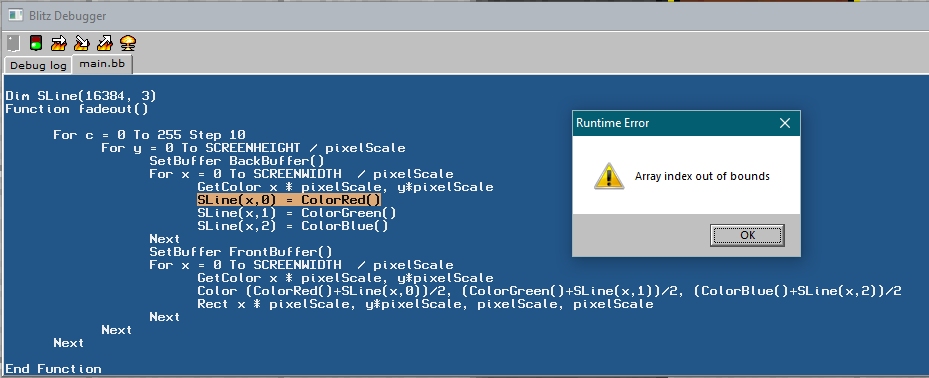
blitz3d error array
Pakz

pixelArtPoster26x6